Planning Task
Projektaufgaben in konkrete Zeitblöcke auf dem Mitarbeiterkalender umwandeln – mit intelligenter Verteilung, die Arbeitszeiten, Urlaub und Abhängigkeiten berücksichtigt.
Projektaufgaben sind geplant – aber wann genau arbeitet wer daran? Wie vermeiden Sie Überlastung? Wie erkennen Sie Deadline-Risiken frühzeitig? Planning Task beantwortet diese Fragen mit einem Klick: Ein Constraint Solver verteilt Aufgabenstunden automatisch auf Mitarbeiterkalender und erzeugt verbindliche Zeitblöcke.
Ihr Nutzen
Der Solver berücksichtigt Arbeitszeiten, Feiertage, Urlaub und bestehende Buchungen – keine Doppelbelegungen, keine Überlastung.
Zweistufige Bestätigung: Mitarbeiter und Manager müssen zustimmen. Bestätigte Slots sind geschützt.
Deadline-Risiken, Produktivitätsabweichungen und Überbudgetierung werden automatisch erkannt und gemeldet.
Mitarbeiter können Umplanungsvorschläge einreichen. Manager genehmigen oder lehnen ab – alles dokumentiert.
Die Aufgabenansicht
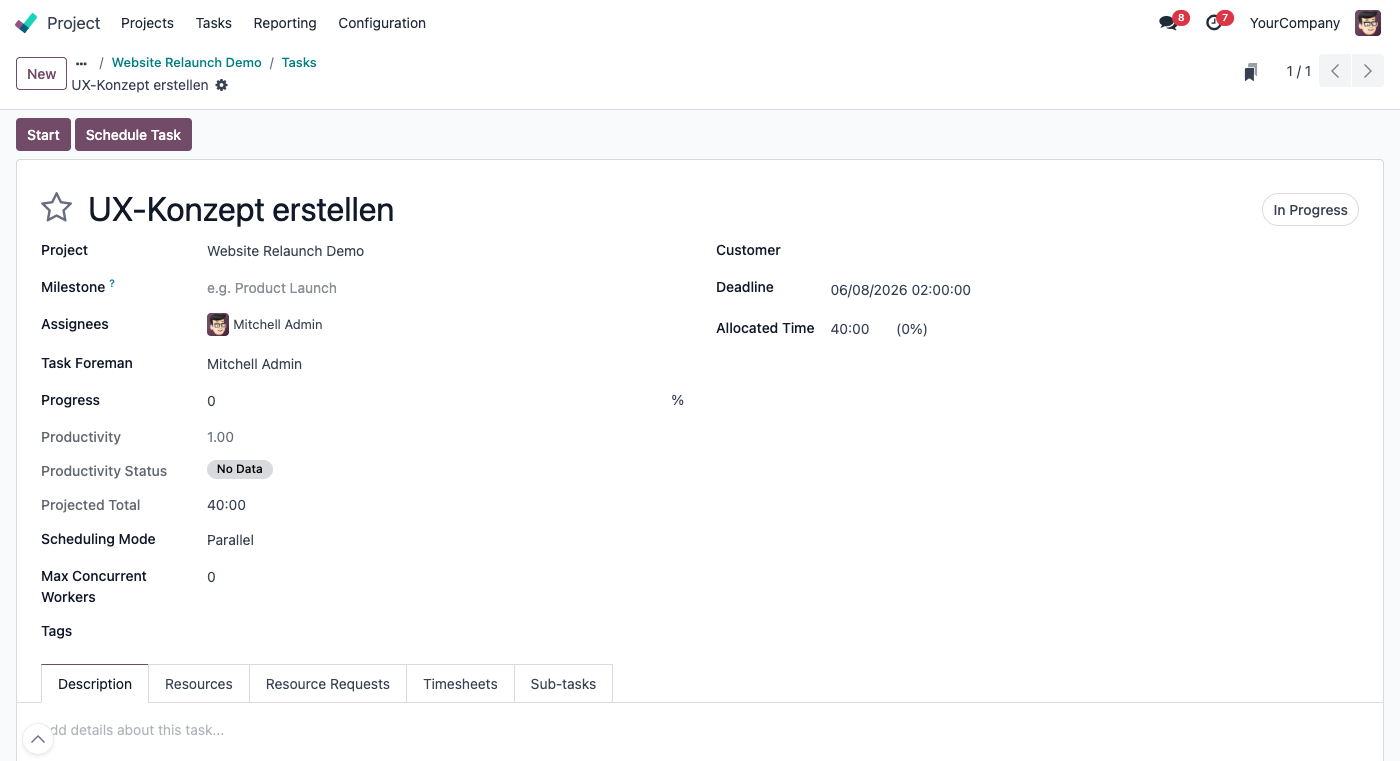
Jede Aufgabe zeigt alle planungsrelevanten Felder: Fortschritt, Produktivität, projizierte Gesamtstunden, Planungsstatus und zugewiesene Ressourcen. Der „Schedule Task“-Button öffnet den Planungswizard.
Prozess 1: Aufgabe planen
Der Planungsprozess beginnt auf der Aufgabe und endet mit konkreten Zeitblöcken im Mitarbeiterkalender:
Weisen Sie der Aufgabe Mitarbeiter zu (Tab „Resources“) oder fordern Sie Ressourcen aus einem Pool an („2 Entwickler aus dem Team“). Material-Ressourcen (Räume, Maschinen) erzwingen automatisch den Parallel-Modus.
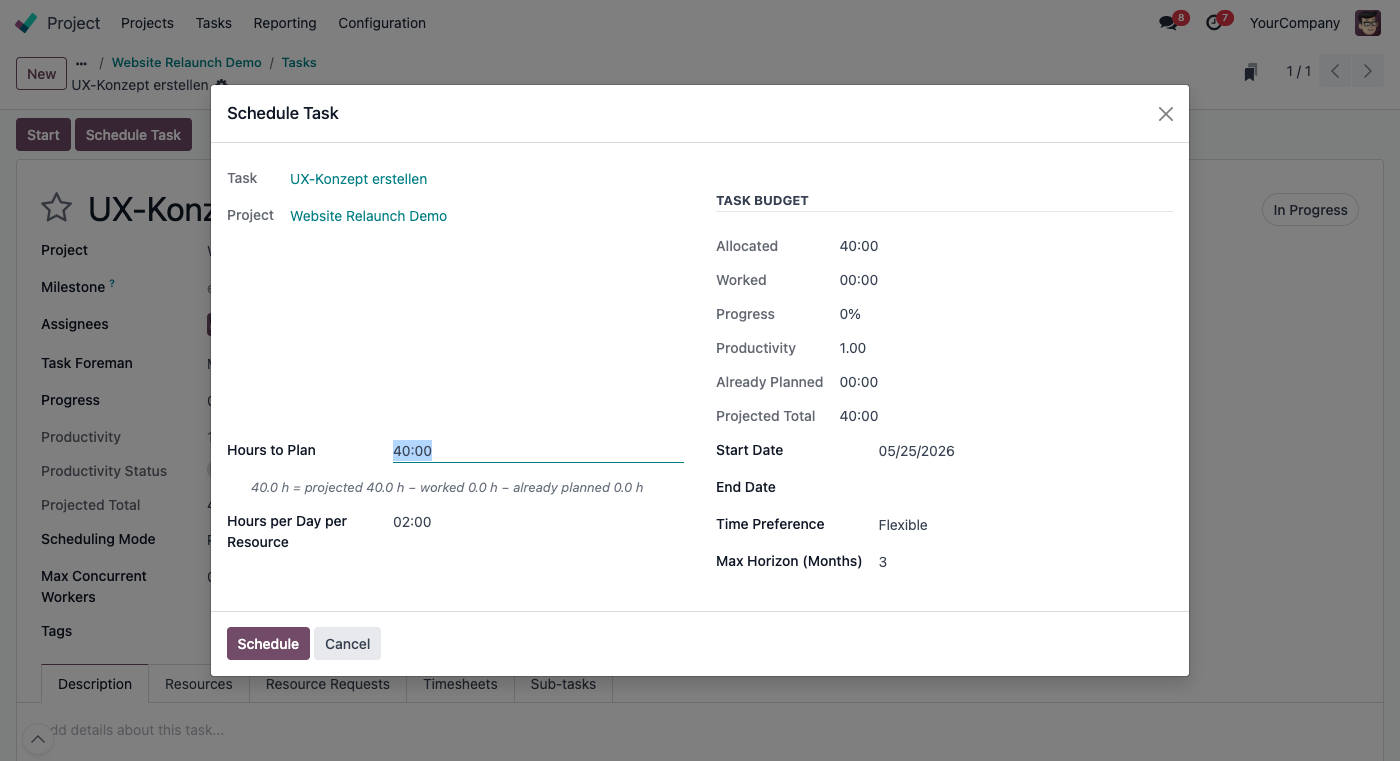
Der Wizard zeigt das aktuelle Budget, geleistete Stunden, Produktivität und die berechneten Reststunden. Wählen Sie Startdatum, Stunden pro Tag pro Ressource, Zeitpräferenz (Vormittag/Nachmittag/Flexibel) und maximalen Planungshorizont.
Der Google OR-Tools Constraint Solver verteilt die Stunden in 15-Minuten-Schritten auf verfügbare Zeitfenster der Mitarbeiter. Er berücksichtigt: Arbeitskalender, Feiertage, genehmigte Abwesenheiten, bestehende Planungsslots und Aufgabenabhängigkeiten.
Die erzeugten Planungsslots sind sofort in der Gantt-Ansicht sichtbar. Der Planungsstatus der Aufgabe aktualisiert sich automatisch: Nicht geplant → Teilweise geplant → Vollständig geplant.
Prozess 2: Bestätigung und Verbindlichkeit
Geplante Zeitblöcke durchlaufen einen zweistufigen Bestätigungsprozess:
Slot wurde erstellt. Gelb im Gantt-Diagramm. Wartet auf Mitarbeiter-Bestätigung.
Mitarbeiter hat bestätigt. Hellblau im Gantt. Wartet auf Manager-Bestätigung.
Beide haben bestätigt. Slot ist geschützt – nur Ersteller, Manager oder PM können ändern.
Prozess 3: Umplanung
Wenn sich Prioritäten ändern, können Mitarbeiter Umplanungsvorschläge einreichen:
Über einen Wizard wählt der Mitarbeiter einen neuen Zeitpunkt und gibt optional einen Grund an. Der Slot wird im Gantt rot markiert.
Genehmigen: Slot wird auf die neue Zeit verschoben. Ablehnen: Vorschlag wird verworfen, ursprüngliche Zeit bleibt.
Prozess 4: Produktivitätsmessung
Das Modul führt ein leichtgewichtiges Produktivitätsmodell ein, das geplante Stunden, tatsächliche Zeiterfassung und manuellen Fortschritt verbindet:
| Kennzahl | Bedeutung | Beispiel |
|---|---|---|
| Fortschritt | Manuell eingetragener Fertigstellungsgrad (0–100%) | 100% |
| Produktivität | Budget × Fortschritt / tatsächliche Stunden | 80h × 1.0 / 26h = 3.08 |
| Status | Ahead (≥1.20) | On Track (≥0.90) | Behind (<0.70) | Ahead |
| Projektion | Hochrechnung der Gesamtstunden basierend auf aktuellem Tempo | 26:00 h (statt 80h Budget) |
Die Planungsansicht
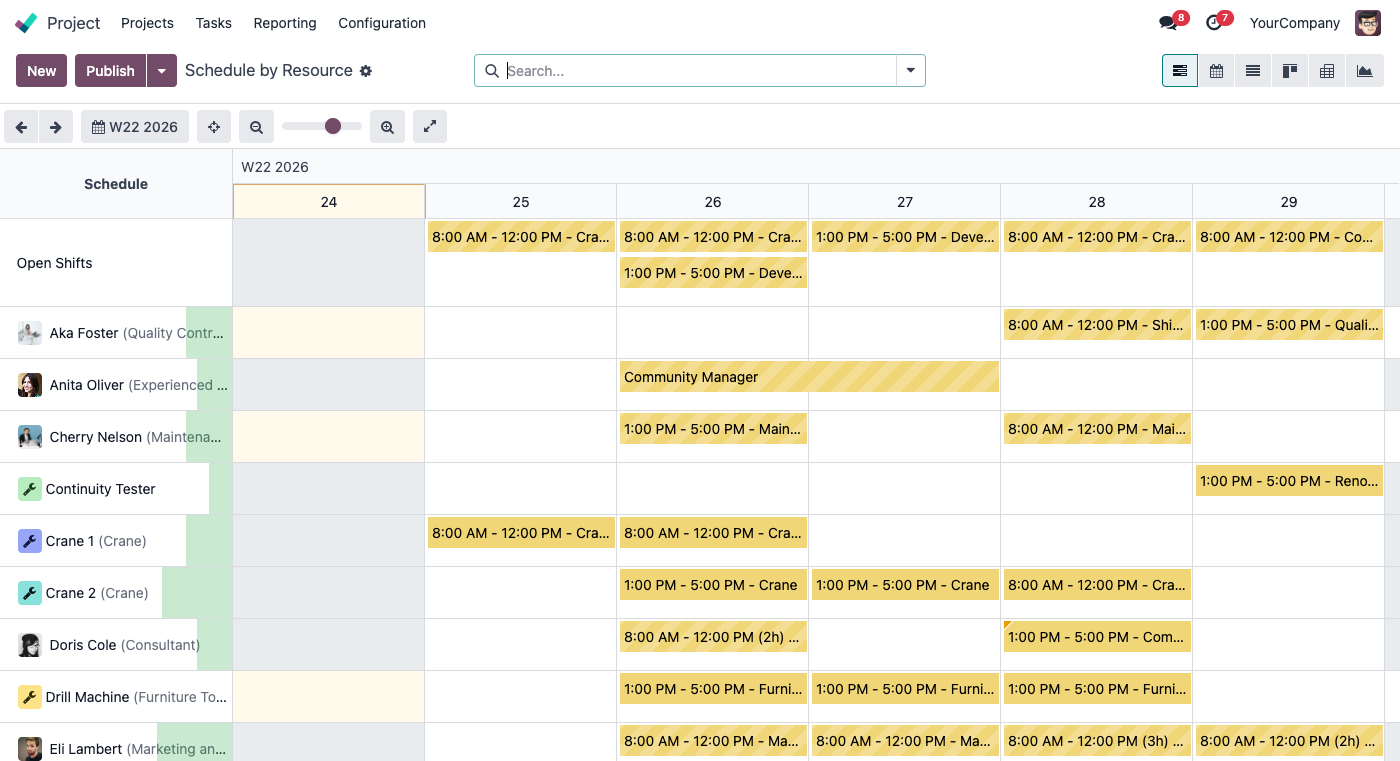
Alle geplanten Zeitblöcke werden in der Gantt-Ansicht pro Mitarbeiter dargestellt. Farbcodierung zeigt den Bestätigungsstatus an: Gelb = angefragt, Hellblau = teilbestätigt, Standard = bestätigt, Rot = Umplanungsvorschlag.
Prozess 5: Aufgabenabhängigkeiten
Wenn Aufgabe B von Aufgabe A abhängt (Odoos eingebautes Abhängigkeitsfeld), berechnet Planning Task automatisch:
Abgeleitet vom Planungsende oder der Deadline des Vorgängers plus einen Tag. Der Solver erzwingt dies als Constraint – Aufgabe B kann nicht vor Abschluss von Aufgabe A geplant werden.
Wenn bestehende Slots vor dem erlaubten Startdatum beginnen, wird eine Warnung auf dem Aufgabenformular angezeigt. So erkennen Sie Planungskonflikte sofort.
Prozess 6: Automatische Bereinigung
Wird eine Aufgabe als „Fertig“ oder „Abgebrochen“ markiert, werden alle verknüpften Planungsslots automatisch entfernt. Ein Chatter-Eintrag dokumentiert, wie viele Slots und Stunden freigegeben wurden.
Wenn die erfassten Stunden den manuell gesetzten Fortschritt deutlich überschreiten (z. B. 75% der Stunden verbraucht, aber nur 20% Fortschritt), wird eine Aktivität für den Task Foreman erstellt.
Für wen ist Planning Task?
Entwicklerteams auf Sprints und Aufgaben planen. Kapazitätsauslastung optimieren. Überlastung vermeiden.
Projektphasen mit Abhängigkeiten planen. Fachkräfte auf Projekte verteilen. Deadlines überwachen.
Maschinen und Personal parallel planen. Ressourcenpools für flexible Teams nutzen.
Berater auf Kundenprojekte disponieren. Auslastung visualisieren. Teilleistungen mit Planung verknüpfen.
Förderfähige Maßnahme
Die Einführung und Anpassung von ERP-Systemen wie Odoo ist in Deutschland förderfähig. Unternehmen können von staatlichen Förderprogrammen profitieren – z. B. über „go-digital“, „Digital Jetzt“ oder länderspezifische Digitalisierungsförderungen. Wir unterstützen Sie gerne bei der Antragstellung.
Interesse geweckt?
Lassen Sie sich unverbindlich beraten – wir zeigen Ihnen, wie Planning Task in Ihre Projektplanung passt.
Beratungsgespräch vereinbaren